
Many schools already have a computer lab. So, when CBSE asks schools to establish a Composite Skill Lab (CSL), one practical question immediately arises:
“If we already have a computer lab, why do we need another skill lab?”
The answer lies in what the two spaces are designed to achieve.
A traditional computer lab is primarily a digital-learning environment. Students use computers to develop digital literacy, learn programming, work with software, access online resources, and study Computer Science or Information Technology.
A Composite Skill Lab, on the other hand, is designed for hands-on, multi-sector skill education. Students may work with tools, machines, materials, technology, plants, and service-related activities while building, testing, and solving practical problems.
CBSE itself treats the computer laboratory and Composite Skill Lab as distinct pieces of school infrastructure. Its affiliation norms separately prescribe computer-lab infrastructure, while Circular Skill-13/2026 establishes CSL requirements for practical skill and vocational education.
The simplest distinction is:
A computer lab primarily helps students learn with and about computers. A Composite Skill Lab helps students learn through different forms of practical work.
Schools can explore STEMpedia’s complete Composite Skill Lab solution:
What is a Traditional Computer Lab?
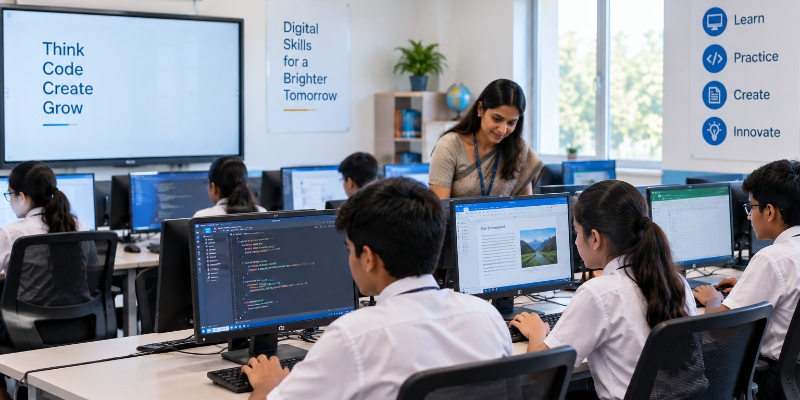
A traditional computer lab is a dedicated space created mainly for computer education and digital learning.
CBSE’s affiliation infrastructure requirements identify the computer laboratory separately and require schools to provide computers, connectivity and appropriate facilities for computer education. Schools offering Computer Science or IT at the Senior Secondary level also need adequate dedicated provisions.
Students typically use the space for activities such as:
- Coding and programming
- Digital literacy
- Computer Science and IT
- Word processing and presentations
- Data handling
- Internet-based learning
- Graphic design or multimedia
- AI and other software-based activities
These are important capabilities, but most of the learning remains centred around digital systems and computer-based tasks.
What is a Composite Skill Lab?

A Composite Skill Lab is a flexible, multi-sector environment where students develop practical skills through activities, tools, projects, and real-world applications.
CBSE’s 2026 guidelines describe CSLs as infrastructure that supports hands-on, activity-based learning and helps bridge the gap between conceptual understanding and practical application. Schools are recommended to choose skill subjects relevant to their context and eventually provide exposure spanning different forms of work.
The framework includes three broad Forms of Work:
- Work with Life Forms: Agriculture, gardening, and other work involving plants or animals.
- Work with Machines & Materials: Electronics, mechatronics, coding, carpentry, apparel, automotive, and other activities involving tools, machines and materials.
- Work in Human Services: Healthcare, retail, finance, tourism, hospitality, and other people-oriented services.
NCERT’s vocational-education framework explicitly identifies these three forms as a way of providing students with broad experiential exposure to work.
For a complete beginner-level explanation of the CSL model, see What Is a Composite Skill Lab? A Complete Beginner’s Guide for CBSE Schools.
Composite Skill Lab vs Traditional Computer Lab: Key Differences
| Aspect | Traditional Computer Lab | Composite Skill Lab |
| Primary Purpose | Computer education and digital skills | Practical and vocational skill development |
| Learning Scope | Mainly computers, software and digital technologies | Multiple skill sectors and Forms of Work |
| Typical Activities | Coding, IT, documents, digital design and software use | Building, making, testing, growing, repairing, designing and service-related projects |
| Learning Method | Primarily computer-based | Hands-on and project-based |
| Infrastructure | Computers, networking, desks and digital devices | Modular tables, tools, equipment, storage, safety systems and technology |
| Student Output | Programs, digital files, presentations and software projects | Physical prototypes, practical tasks, digital solutions and interdisciplinary projects |
| Flexibility | Primarily configured for computer use | Designed to be rearranged for different skill activities |
| Forms of Work | Mainly Machines & Materials through digital technology | Intended to provide wider exposure across the three Forms of Work |
| Career Exposure | Mainly digital and computing-related pathways | Wider vocational and career exploration |
| CBSE Role | Dedicated computer-education infrastructure | Dedicated practical skill-education infrastructure |
This broader, multi-sector character is also reflected in the earlier CSL planning material: an IT Lab can support areas such as coding, AI, animation, and digital skills, but it does not by itself represent the complete Composite Skill Lab model.
Why Can’t a Computer Lab Simply Be Called a Composite Skill Lab?
A computer lab may already contain valuable CSL resources:
- Computers
- Internet connectivity
- Coding software
- AI tools
- Multimedia resources
- Digital-design applications
But a full Composite Skill Lab involves more than access to digital technology.
CBSE recommends that schools plan skill subjects across the three Forms of Work and install infrastructure, tools, furniture, and safety provisions based on the sectors selected. The CSL guidelines also emphasise adaptability, practical work and adequate space for batches of students.
So the correct approach is not:
Computer Lab → Rename it Composite Skill Lab
It is:
Computer Lab → Identify what it can support → Map missing skill sectors and infrastructure → Build the wider CSL ecosystem
The previous implementation framework developed for your CSL series follows this same principle: existing laboratories can meaningfully support implementation, but schools should first determine what can be reused, what is missing, and what needs to be added.
Can Schools Still Use Their Existing Computer Lab for CSL Activities?
Yes.
An existing IT or computer lab can remain extremely useful.
For example, it can support:
Coding and AI: Students can programme, train models and analyse data.
Digital Design: Students can create graphics, animations, presentations or digital prototypes.
Electronics and Robotics: Computers can run programming platforms used to control sensors, microcontrollers and robots.
BFSI and Services: Digital simulations and applications can support finance, retail and other service-related learning.
The important distinction is that the computer lab contributes to the CSL ecosystem; it does not automatically replace the broader CSL infrastructure.
For schools trying to reuse what they already have rather than building everything from zero, read How Schools Can Use ATL, IT Labs and Makerspaces for CBSE Composite Skill Lab Setup.
What Should Schools Do If They Already Have a Good Computer Lab?
Do not discard it.
Use it strategically.
Begin by mapping the existing computers, software, networking, furniture, and digital-learning resources against the skill sectors your school wants to offer.
Then determine what is missing, such as:
- Practical tools
- Electronics or mechatronics equipment
- Modular project tables
- Storage
- Safety infrastructure
- Life Forms activities
- Human Services activities
- Sector-specific project materials
- Teacher preparation
This turns CSL planning into an infrastructure-gap exercise rather than a complete restart.
For schools moving from comparison to actual implementation, the next useful step is How to Set Up a Composite Skill Lab in Phases – From Readiness to Launch.
Conclusion
A traditional computer lab and a Composite Skill Lab are not two versions of the same facility.
A computer lab gives students access to digital tools, computing, and software-based learning.
A Composite Skill Lab expands that experience into the physical world, where students can work with tools, build, test, troubleshoot, collaborate, and explore different forms of productive work.
For schools, this distinction matters because the question is no longer simply:
“Do we already have enough computers?”
The more useful question is:
“Do our students have a structured environment where they can apply knowledge through real practical work?”
That is the gap the Composite Skill Lab is designed to fill.